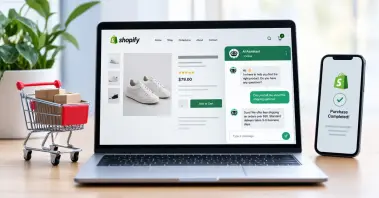

Your website gets visitors every day. But how many of them actually turn into paying customers? In 2026, the average website converts less than 3% of its traffic. The other 97% leave without buying, booking, or even leaving their contact details. The businesses closing that gap are not running more ads or redesigning their homepages. They are adding AI chatbots that respond instantly, qualify leads automatically, and work around the clock without a single day off. Moreover, businesses using AI chatbots report a 67% increase in lead conversions. So, if you’re still googling, “How to add chatbot to website?” then you’ve come to the right place! This blog will show you exactly how to replace outdated contact forms and slow email replies with PerfectCSR, step by step.
Stop Letting Generic Chatbots Run Your Business Into the Ground
Not all AI chatbots are built the same, and the difference shows up directly in your customer experience, your lead numbers, and your bottom line. Businesses that settle for basic chatbot integration end up with a bot that confuses visitors, misses leads, and damages their customer support reputation.
Here is what sets a purpose-built like PerfectCSR AI chatbot agent apart:
- Trained on Your Data, Not Generic Scripts: Our AI customer service agent learns directly from your website, uploaded files, audio recordings, and videos.
- Multi-Level Training Across Every Format: Most chatbots only read your homepage. Our AI chatbot agent trains across five input types including website URLs, documents, pasted text, YouTube videos, and voice notes, retaining every detail permanently.
- Built to Convert Leads: Our AI customer service agent captures lead details before the conversation even begins.
- Maximum Lead Capture at Every Touchpoint: Unlike generic bots, our AI chatbot agent collects visitor information the moment they open the chat widget so no lead ever leaves your site anonymously.
- Unresolved Chat Log is one of the most valuable long-term features PerfectCSR offers. It captures unanswered questions so you can improve training data, fix gaps, and steadily boost bot performance over time.
- Cloud-Based Data Security: All training data, conversation logs, and lead information are stored securely in the cloud with zero infrastructure management on your end.
Now that you know the perks of PerfectCSR, let us walk you through exactly how to deploy this AI chatbot agent on your own website.
See It Live Before You Build It
Before walking through the full setup process, it is worth showing you what PerfectCSR actually looks and feels like in action. All you have to do is drop your website URL into the live demo on our homepage. PerfectCSR will crawl your pages, train itself on your existing content, and hand you a working bot in your own branding. It will be ready to test in minutes, no sign-up required for the preview.
This is not a simulated demo. The bot you see is trained on real content from your actual website. You will see how it answers questions about your products or services, how it handles follow-up queries, and how it sounds when speaking in your brand's voice. Over 2,481 sites have been trained this week. The average time from URL submission to a live, testable bot is 3 minutes and 48 seconds.
Step-by-Step Guide on How to Add AI to Your Website
The following steps take you from a blank dashboard to a fully deployed AI chatbot on your website. No technical background is required.
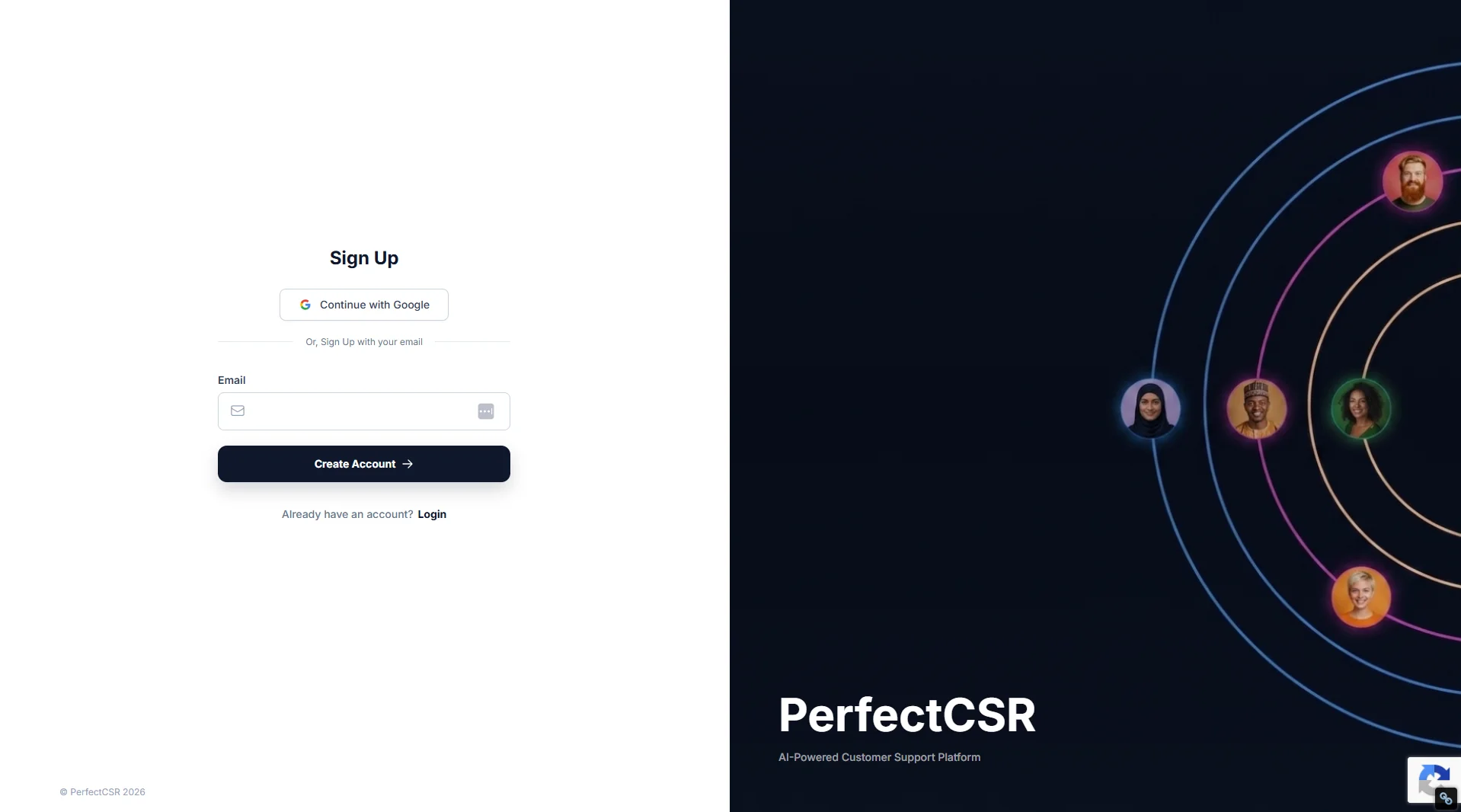
Step 1: Create Your Free Account
You can sign up using your business email address. There is no credit card required to get started, and you receive full access to every feature for 30 days at no cost. If PerfectCSR is not the right fit for your business, you can cancel anytime without being charged.
The sign-up process takes less than 60 seconds. Once you are inside the dashboard, everything is laid out clearly with guided prompts that walk you through each next step.
Step 2: Create Your Bot & Set the Basics
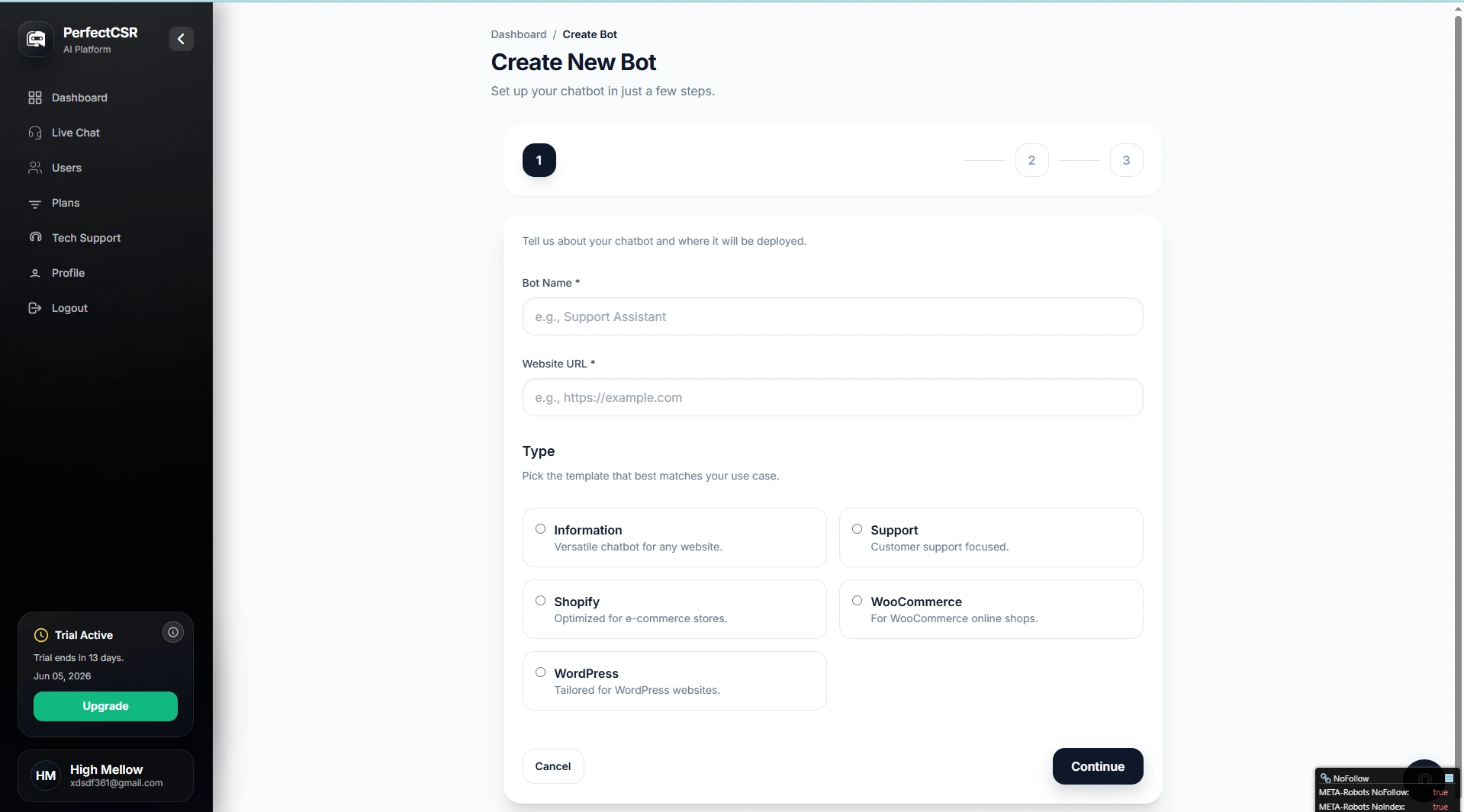
Inside your dashboard, click "Create New Bot" to begin the setup. You will be asked to provide three pieces of information before moving forward.
- Bot Name: The name your chatbot uses when introducing itself to visitors.
- Website URL: The link PerfectCSR uses to crawl your website content.
- Bot Type: The template that matches your business operations best.
PerfectCSR offers five bot types to choose from. The Information template is flexible and works for any type of website. The Support template is designed specifically for customer service and ticket resolution. The Shopify template is built for e-commerce stores running on Shopify. The WooCommerce template is built for online shops using WooCommerce. The WordPress template is made for WordPress websites and makes embedding even more straightforward than the standard method. Therefore, you start with a chatbot already optimized for your industry, not from scratch.
Step 3: Train Your Bot on Your Content
PerfectCSR is powered by generative AI, which means it does not rely on rigid scripts or decision trees. After you submit your website URL, it begins crawling your site. Moreover, the AI chatbot agent can process up to 500 pages from your website in a single session. From those crawled pages, you select up to 25 specific pages you want the chatbot to train on. The pages you choose should represent the knowledge your customers need most. Your product or service pages, pricing information, FAQs, booking details, and your homepage are strong starting points.
PerfectCSR reads every word on the pages you select. It absorbs your tone, your terminology, your offers, and the specific language your brand uses. Within minutes, your chatbot has the same depth of knowledge that would take a new hire weeks to develop through onboarding, and it retains every detail without error or inconsistency.
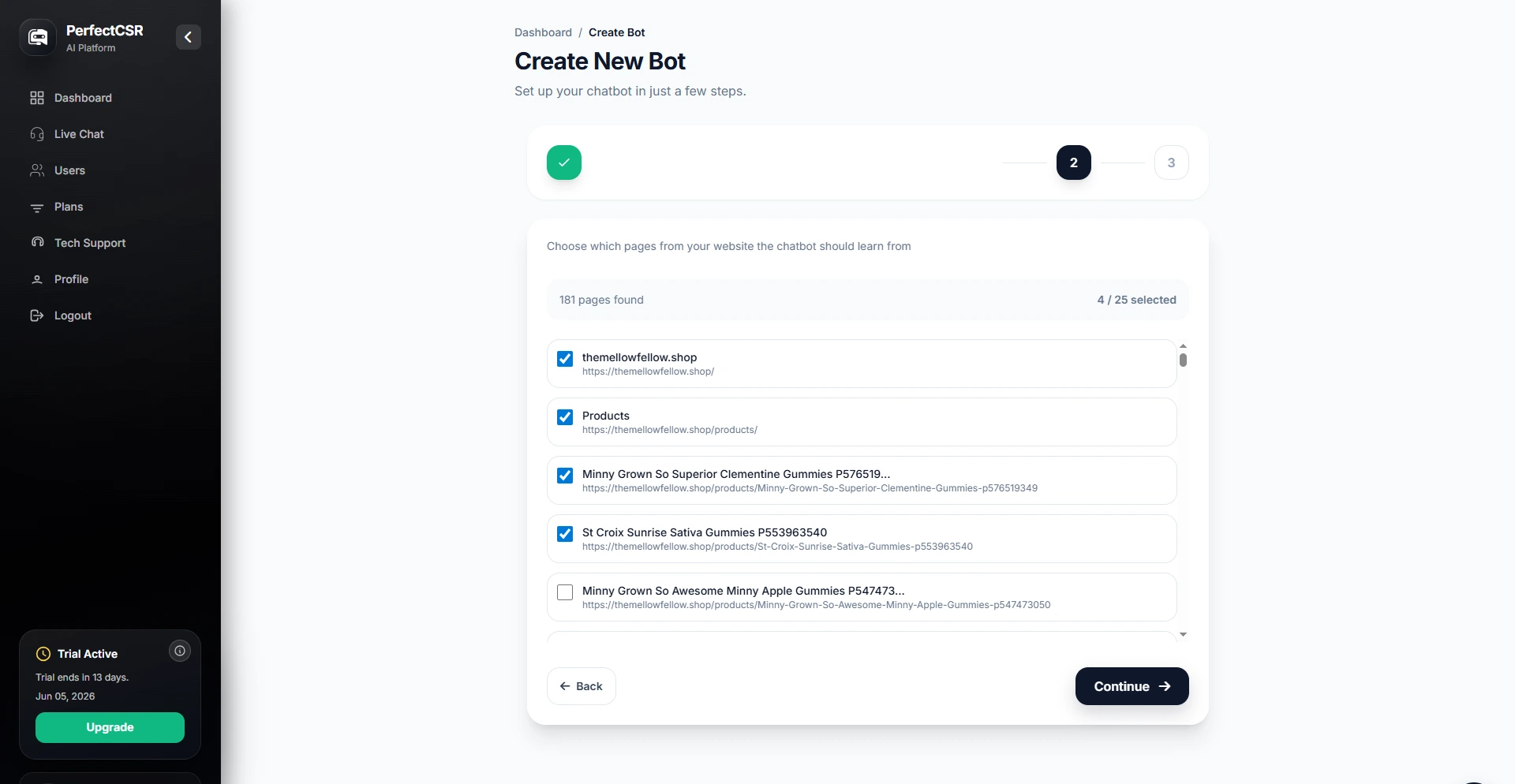
Step 4: Embed the Chatbot on Your Website
Once training is complete, PerfectCSR generates a single embed script tied to your bot. You will receive a notification as soon as training finishes and your bot is ready to go live. To deploy your chatbot, you paste that script into the header section of your website, just before the closing head tag. This works on every major website platform. For WordPress users specifically, the WordPress bot type makes this even simpler, with a streamlined embed process designed for that platform's settings structure.
After the script is in place and your site changes are saved, your chatbot is live. Visitors to your website will see the chat bubble appear and can begin interacting with your AI agent immediately. It also supports embedding through the JavaScript API, which means you can trigger the chat window from any button, link, banner, or promotional element on your site. This gives your marketing team control over exactly where and when the chatbot is presented to visitors 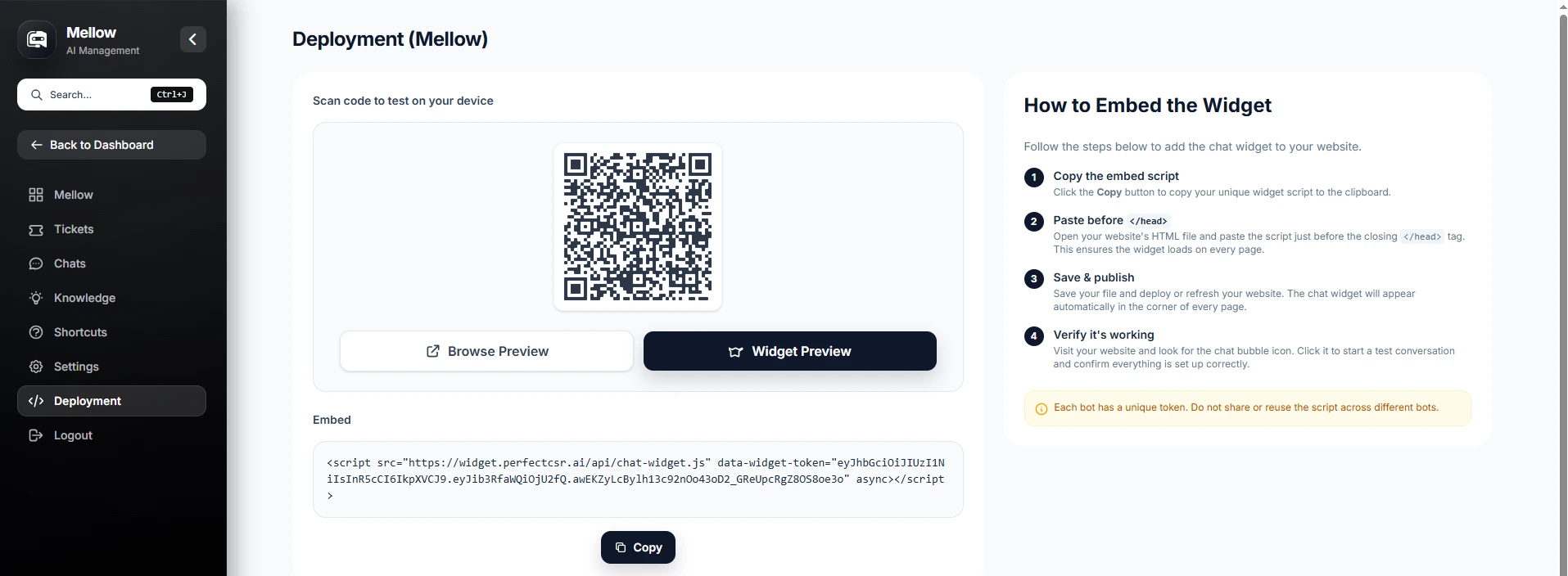
Step 5: Test Thoroughly Before You Drive Traffic
Launching your chatbot before testing it properly is one of the most common mistakes businesses make with AI tools. With PerfectCSR gives you two ways to test before a single customer sees your bot.
- QR Code Preview: Scan to test the chatbot on mobile.
- Browser Preview: Test the full desktop experience directly in your dashboard.
Ask the questions your most demanding customers ask. Test edge cases, pricing objections, and anything that might reveal a gap in training. If the bot struggles with an answer, go back to the training panel, fill the gap, and retest. Once you are satisfied with the performance, publish your changes and let PerfectCSR go to work. .
How PerfectCSR Trains Faster Than Any New Hire
Training a new customer service representative takes weeks. Our AI customer service agent trains in minutes and retains everything perfectly. Here is a summary of every training method available to you:
- Website URLs allow PerfectCSR to crawl your entire website automatically. Blog posts, product pages, service descriptions, policies, and FAQs are all processed and kept current as your site evolves.
- Documents let you upload any file your team already uses. Product manuals, onboarding guides, pricing sheets, and service catalogs all become part of your chatbot's knowledge base the moment you upload them.
- Pasted Text is ideal for information that lives inside your team but has never been written into a public-facing format. Seasonal promotions, internal FAQs, or script templates can all be added this way.
- YouTube Links turn your video content into training material. Every tutorial, walkthrough, and demo your business has recorded becomes knowledge your chatbot can reference and explain.
- Voice Notes give you the most natural input method of all. Record yourself explaining how a product works, how a process flows, or how your team handles specific scenarios. The bot transcribes and learns from your own words.
This combination of training sources is what separates PerfectCSR from tools that only scrape your homepage and call it done. Your chatbot learns the full depth of your business knowledge across every format you use.
Every Feature Your Business Gets with PerfectCSR
PerfectCSR is built to replace the repetitive, time-consuming work that takes your team away from high-value conversations. Here is a detailed look at what you get from day one.
Instant Agent Handover: transfers any conversation to a live team member with one click, along with the full chat history, visitor details, and source page. A support ticket is created automatically so no lead is lost.
Visual Funnels and Shortcuts: let you build guided conversation paths directly inside the chat window. You can create quick-tap buttons such as "What deals are available today?", "Speak to a team member", or "Book a consultation", and arrange them in any order.
Custom Response Skills: give you control over how your chatbot presents information. Products can be displayed as visual cards. Promotions can be shown with clickable links. Comparison lists can be formatted cleanly for easy reading.
Lead Generation Forms: allow you to capture visitor information before a conversation even begins. A custom form appears as the chat widget opens, collecting whatever fields matter to your business, whether that is name, email, phone number, company size, or something specific to your industry. This turns anonymous visitors into real, contactable leads.
Team Management with Role-Based Access: lets you bring your entire team into PerfectCSR without confusion or overlap. Admins control the bot settings and billing, while managers review ticket queues and performance reports. Agents handle live chats as they come in.
Automatic Ticket Creation: means that every unresolved question, every request for a human, and every completed lead form automatically becomes a structured ticket. Each ticket includes the full chat history, the visitor's contact information, their IP location, and the source page they came from.
Live Chat Dashboard: gives your team a real-time view of every pending chats, active conversations, resolved tickets, and live sessions are all visible from one screen. You can jump into chats, switch between bot and human, or mark them resolved without changing tools.
Real-Time Analytics: track key metrics like chats, messages, response rates, unresolved queries, and storage in real time, with filters to view trends and measure ROI.
Ready To Turn Conversations Into Customers?
Launch a no-code AI chatbot that answers questions, captures leads, and helps your business grow 24/7.
Start Your Chatbot FreeChoose the Persona That Represents Your Brand
We know that every business communicates in a different manner, and not every visitor needs the same experience. PerfectCSR gives you three distinct personas and you can switch between them at any time.
- The Sales Rep persona is built to engage and convert. It uses product details, social proof, and well-timed prompts to move hesitant visitors toward a decision. It is the right choice for e-commerce stores and high-ticket service providers.
- The Helpful CSR persona is warm, professional, and precise. It answers support questions the way your best front-desk hire would, with patience and clarity. It works well for service businesses and SaaS companies where trust and accuracy matter most.
- The Appointment Scheduler persona handles the entire booking process end to end. It syncs with your calendar, sends confirmations, manages reschedules, and never loses a booking to a missed reply. Healthcare providers, consultancies, and any appointment-driven business will find it handles a significant share of their daily admin automatically.
Ready to Turn Your Website Into a 24/7 Sales Machine?
You now have everything you need to understand how to integrate ai chatbot in website. And more importantly, how to do it in a way that actually drives real results for your business. The steps are straightforward, and the setup is fast. Plus, the impact on your lead capture, customer response times, and overall conversion rate can be significant from day one.
In 2026, your customers expect instant answers, and the businesses that deliver them are the ones closing more deals, booking more appointments, and capturing more leads every single day. PerfectCSR gives you exactly that. Trained on your content, live on your site, and speaking in your brand's voice, it is the one tool your website needs to stop losing visitors and start converting them. Your next milestone becomes a reality the moment THIS chatbot goes live. So, complete your chatbot sign up today and start your free 30-day trial!
FAQs:
Q1: Can PerfectCSR handle multiple industries on the same account?
Yes. You can create separate bots for different businesses, each with its own chatbot integration, unique training data, and managed from one dashboard.
Q2: What happens if a visitor asks something the bot has never been trained on?
It gets logged automatically. Your customer support team reviews it, adds the answer step by step, and the bot improves immediately.
Q3: How does PerfectCSR improve the overall customer experience over time?
Every unresolved question is logged in real time. Your team fills the gap, retrains the bot, and the customer experience improves consistently week after week.
Q4: How quickly will my chatbot start capturing leads after going live?
Immediately. The lead form activates the moment a visitor opens the widget, collecting their details in real time before the first message is sent.
Q5: Can I add an AI chatbot to my WordPress website without a developer?
Absolutely. PerfectCSR makes it straightforward to add an AI chatbot to your WordPress website step by step, with no code and no technical background needed.