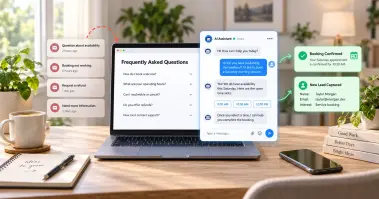

Your customers demand fast answers today. Around 90% of buyers say an instant reply is important when they need help. Hiring a new agent for every spike in chats costs too much and takes months. Multiple sources predict that agentic AI will resolve 80% of common service issues by 2029. Speed wins deals, and the numbers back it up. Leads contacted within one hour are about seven times more likely to have a real sales talk. Wait a day, and that hot lead has probably moved on.
So how do you keep up without hiring a new agent every time chats spike? This is where PerfectCSR comes in! It's a 24/7 AI chat agent that answers, captures leads, and books appointments while you sleep or enjoy your holidays. So, we are here to show you how to scale customer communication the smart way without breaking the bank.
Why Hiring Alone Does Not Solve the Problem
Most growing teams follow one path. Chats go up, so they hire more agents. Then chats go up again, and they hire again.
This path has three problems.
- Hiring is slow. You post the job, screen people, and train them. That can take weeks or months.
- It is costly. Each agent needs pay, tools, training, and management time. Costs grow as fast as your volume.
- People cannot work around the clock. Night shifts and weekend shifts add even more cost. Yet your buyers browse at all hours.
Now think about what your team actually answers each day. Most of it is the same. Where is my order? What are your hours? Can I book a time? Do you offer this product?
These questions do not need a human touch. They need a fast, correct, and friendly reply. That is where smart automation helps you grow.
How to Scale Customer Communication With Smart Automation
The goal is not to replace your team. The goal is to let your team focus on work that needs a human. Everything else can run on its own. Growth-focused support teams follow a simple plan. They deflect repeat volume, automate workflows, and build strong self-service.
Let us walk through each step. Then we will show you how PerfectCSR puts them all in one place.
Scale Customer Communication by Deflecting Repeat Questions
Deflection means solving a question before it reaches a human. It is the fastest way to cut your workload. You can think of your inbox as a pile. Some of the pile needs a person. A large part does not. Deflection removes the second part.
Here are three ways to do it.
-
Deploy an AI Resolution Layer
An AI resolution layer sits at the front of your chat. It greets each visitor and answers common questions on its own. Good AI does more than match keywords. It understands what the visitor wants. Then it gives a clear answer using your own content.
This layer never gets tired. It replies in seconds at 3 a.m. and at 3 p.m. It can handle ten chats or ten thousand chats with the same quality. That is the core of how you scale customer communication without adding headcount. Your team stops being the first line. The AI takes that spot.
-
Build an Active Knowledge Base
A knowledge base is a set of clear answers to common questions. Think product details, hours, policies, and service steps. Many teams build one and forget it. An active knowledge base is different. You keep it fresh, and you show it at the right moment.
Here are simple tips:
- Write short articles with one answer each.
- Use plain words that a new visitor understands.
- Update pages when your offers change.
- Place answers where people ask the question.
When your content is strong, your AI gives better replies. Good input leads to good output.
-
Send Proactive Messages
Proactive messages reach customers before they ask. They cut inbound chats at the source. For example, you can send an order confirmation right away. You can warn about a delay before anyone complains. You can remind a client about an upcoming visit.
Each message you send early saves a chat you never have to answer. Over a month, that adds up fast.
Automate Workflows and Routing
Deflection handles the easy questions. Workflows handle everything that remains. Here is where you save even more time.
Use Smart Triage and Routing
Triage means sorting each request by need. Some chats are simple. Some are urgent. Some are ready to buy. Without triage, agents waste time reading and sorting. With triage, each request lands with the right person right away.
Intent-based sorting looks at what the visitor wants. A buyer with pricing questions goes to sales. A client with an urgent issue goes to a staff member fast. This cuts handling time. It also makes customers feel heard, since they reach the right person on the first try.
Use Tech-Touch Lifecycle Steps
Tech-touch means guiding customers with automation instead of manual check-ins. You trigger help based on what a person does.
For example, a new visitor lands on your pricing page. A friendly chat opens and offers help. A returning lead asks about a product. The chat shares the details and offers next steps. You do not need a person to watch every visitor. The system does that for you.
Keep Every Conversation in One Place
Scattered tools slow your team. When chat, email, and social messages live in different places, agents lose context. One shared view fixes this. Your agents see the full story before they reply. Customers never repeat themselves.
Even small teams gain from this. Less searching means more time helping people.
Meet PerfectCSR: Your 24/7 AI Customer Support Agent
We built PerfectCSR to put all of these ideas in one simple tool. It is an AI growth agent made for businesses that want to grow without growing payroll. PerfectCSR is trained on your own website, files, and voice. Then it goes live on your site in under an hour. There is no code and no complex setup.
Once live, it does the work of a busy front desk. It answers questions, captures leads, and books appointments. Then it hands off to your team the moment a human touch is needed.
Never lose a booking to "we'll get back to you" again. Start your free trial of PerfectCSR and see it work on your own site. No credit card is required, and you can cancel anytime.
Choose the Right Voice With Built-In Personas
Every business talks in its own way. PerfectCSR lets you pick a persona that fits the job.
- Support Agent: Patient, clear, and focused on getting the customer to a resolution.
- Sales Assistant: Upbeat and persuasive, built to move a conversation toward a decision.
- Lead Generator: Asks the right questions and captures every visitor who is worth following up with.
- Technical Support: Precise and methodical, walks customers through a fix step by step.
- Custom Persona: Build a voice that is entirely your own, from scratch.
This means one tool can play many roles. Your sales page can use the Sales Assistant. Your help page can use the Support Agent. You match the tone to the moment.
Guide Visitors With Visual Funnels and Shortcuts
Visual Funnels let you map how a chat should flow. You decide the path from hello to booked call.
Shortcuts give visitors quick buttons for common needs. They tap, and the chat moves forward. This keeps conversations short and focused.
Better flow means more finished chats. It also means more visitors reach the step you want, like a booking or a lead form.
Shape Answers With Custom Responses & Skills
Some questions need an exact answer. Custom Responses let you set the words yourself. That keeps your brand voice steady and your facts correct. Skills add extra abilities to your agent. You choose what your chatbot can do for each use case. You stay in control. The AI works inside the rules you set.
Capture Every Worth-Following Lead
A visitor who leaves without a word is a lost chance. PerfectCSR uses a user lead form to collect contact details inside the chat. The Lead Generator persona asks smart questions first. Then it captures details from visitors who show real interest. Your team gets a clean list to follow up on. Around the clock, this works like a sales team that never sleeps. Late-night visitors still get a warm welcome and a next step.
Keep Your Team in the Loop
Automation should never trap your customers. Some talks need a person, and PerfectCSR knows it.
When a chat needs a human, the agent hands it to your team right away. Urgent queries get routed to staff, so nothing important sits in a queue.
Team Management with multi-level user access lets you organize who sees what. Owners, managers, and agents can each have the right level of access. That keeps your workspace tidy as your team grows.
Get Smarter Every Week
The best tools improve over time. PerfectCSR gives you two ways to make that happen.
Learn From Unresolved Chats
Continuous Learning uses an Unresolved Chat Log. It shows the questions your AI could not answer yet. Think of it as a to-do list from real customers. You see what people ask. Then you add answers to your content. Next time, the AI handles it. Each week, the gap gets smaller. Your automation grows stronger without extra staff.
Decide With Real-Time Analytics
Guessing is expensive. Real-Time Analytics show what is happening right now. You can see how many chats come in, what people ask, and how your funnels perform. Then you can act on facts. Clear data helps you tune your persona, fix weak spots, and prove the value of your chat agent to your team.
How PerfectCSR Helps Different Industries
Every industry has its own repeat questions. Here is how PerfectCSR fits a few of them.
- Healthcare clinics. PerfectCSR books appointments, answers patient questions about your services, and shares clinic info. It also routes urgent queries to staff, 24/7. To be clear, it does not give health advice. It handles scheduling and clinic details so your front desk can focus on patients in the room.
- Sales and service businesses. Buyers want product info fast. The sales assistant answers their questions and moves them toward a decision. That helps you close deals while your team sleeps.
- Lead-driven companies. If your growth depends on inquiries, speed matters. The lead generator captures details and qualifies interest, so no good lead slips away.
- Technical and support teams. The technical support persona guides customers through fixes step by step. Your experts then handle only the hard cases.
In every case, the result is the same. Your customers get quick replies, and your team gets breathing room.
How to Measure Your Progress
You cannot improve what you do not track. Watch these numbers as you grow.
- First response time: How fast does a visitor get a reply? With AI, this should drop to seconds.
- Deflection rate: What share of chats are solved without a human? Aim to raise it each month.
- Leads captured: How many visitors turn into contacts? Compare this before and after launch.
- Bookings made: How many appointments come from chat? This shows direct business value.
- Handoff quality: Do escalated chats reach the right person fast? Fewer delays mean happier customers.
Review these each week. Small fixes add up to big gains over a quarter.
Your 5-Step Plan to Get Started
You do not need a long project. Here is a simple path.
- List your top 20 repeat questions. Pull them from your inbox and chat history.
- Gather your content. Collect web pages, files, and voice notes that hold the answers.
- Launch PerfectCSR. Train it on your content and go live in an hour.
- Pick your persona. Match the voice to the page, such as sales or support.
- Review and improve. Check the Unresolved Chat Log and analytics every week.
Want more ideas on this topic? Community threads like this discussion on scaling customer support solutions show how other teams tackle it. Then explore more guides on the PerfectCSR blog for tips you can use today.
Grow Your Reach, Not Your Payroll
Growth should not mean endless hiring. When you scale customer communication with the right tools, your team can do more with the people you already have. Start by deflecting repeat questions. Then automate your workflows and keep every chat in view. Finally, give your visitors a friendly agent that works every hour of every day.
That is what we built PerfectCSR to do. It answers, captures, books, and hands off to your team at just the right time. You get faster replies, more leads, and fewer missed chances. Ready to see it in action? Start your free 30 day trial today and turn more visitors into customers. No credit card required, and you can cancel anytime.
Ready To Turn Conversations Into Customers?
Launch a no-code AI Agent that answers questions, captures leads, and helps your business grow 24/7.
Start Your Ai Agent FreeFAQs
How can I scale customer communication without hiring more people?
Let PerfectCSR handle the repeat questions. It answers visitors, captures leads, and books appointments 24/7. Your team then focuses on the chats that need a human.
Will PerfectCSR replace my support team?
No. We built it to support your team, not replace it. It handles the routine work. When a visitor needs a person, it hands the chat off right away.
Can I change how the chatbot sounds?
Yes. Pick from Support Agent, Sales Assistant, Lead Generator, or Technical Support. You can also build a custom persona with a voice that is all yours.
Does PerfectCSR help me get more leads?
It does. The Lead Generator persona asks the right questions. Then the User Lead Form captures contact details from visitors worth following up with.
Can it book appointments for my business?
Yes. PerfectCSR books appointments right inside the chat, at any hour. For healthcare clinics, it also answers patient questions about services, shares clinic info, and routes urgent queries to staff. It does not give health advice.
What happens when the AI cannot answer a question?
The question lands in your Unresolved Chat Log. You see what customers asked, add the answer, and the AI handles it next time.
How do I know if it is working?
Real-Time Analytics show your chat volume, common questions, and funnel results. You can act on facts instead of guesses.
Can my whole team use it?
Yes. Multi-level user access lets you set who sees what. Owners, managers, and agents each get the right level of control.